
Read Aloud
Listen to a PDF with the Windows voices on your PC.
All editions, including Free
About this feature
What it does
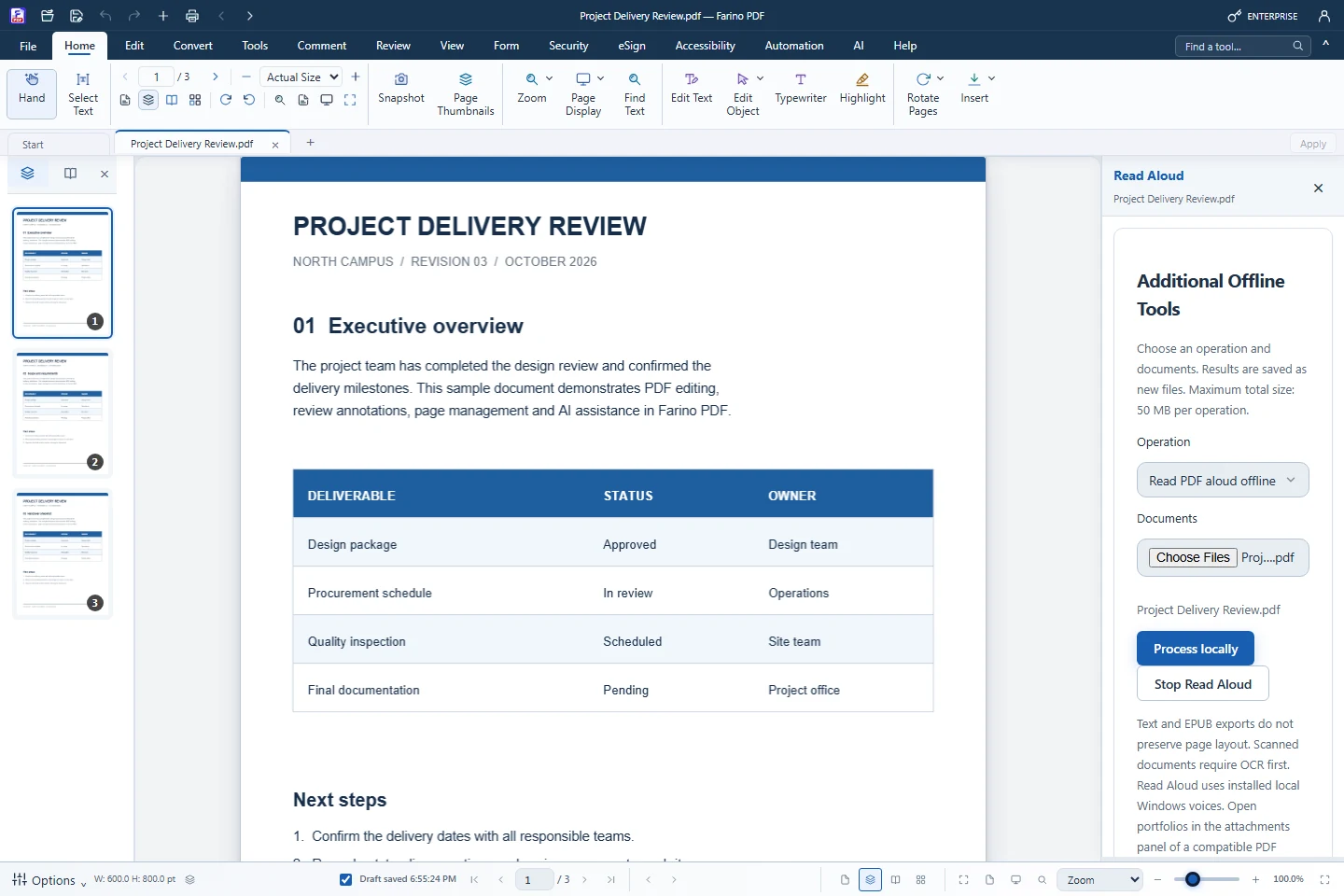
Read Aloud reads the document from the beginning using the voices installed in Windows, preferring an Indonesian voice when one is available. Together with Read Mode, zoom and the accessibility audit, it makes long documents easier to follow.
- Offline reading with installed Windows voices
- Prefers an Indonesian voice when installed
- Read Mode and Fit Content zoom
- Accessibility audit and tagged text export
- Free edition
How to use it
Short steps in the Farino PDF app. The full guide is in the documentation.
Read the full guideChoose Accessibility › Read Aloud
The active PDF is listed under Documents.
Process locally
Reading starts from the beginning.
Stop Read Aloud
Stop whenever you like.
Start with the free edition today.
Upgrade from inside your account when your work needs more.
- Free edition, no account
- Signed installer
- Local support